
Every no-code application builder pitch sounds the same: ship faster, need fewer developers, democratize software creation. What the pitch leaves out is the list of things you hand over when you sign up.
This isn’t an argument against no-code. It’s an argument for knowing exactly what you’re trading before you commit production workloads — and especially AI workloads — to a platform you don’t fully control.
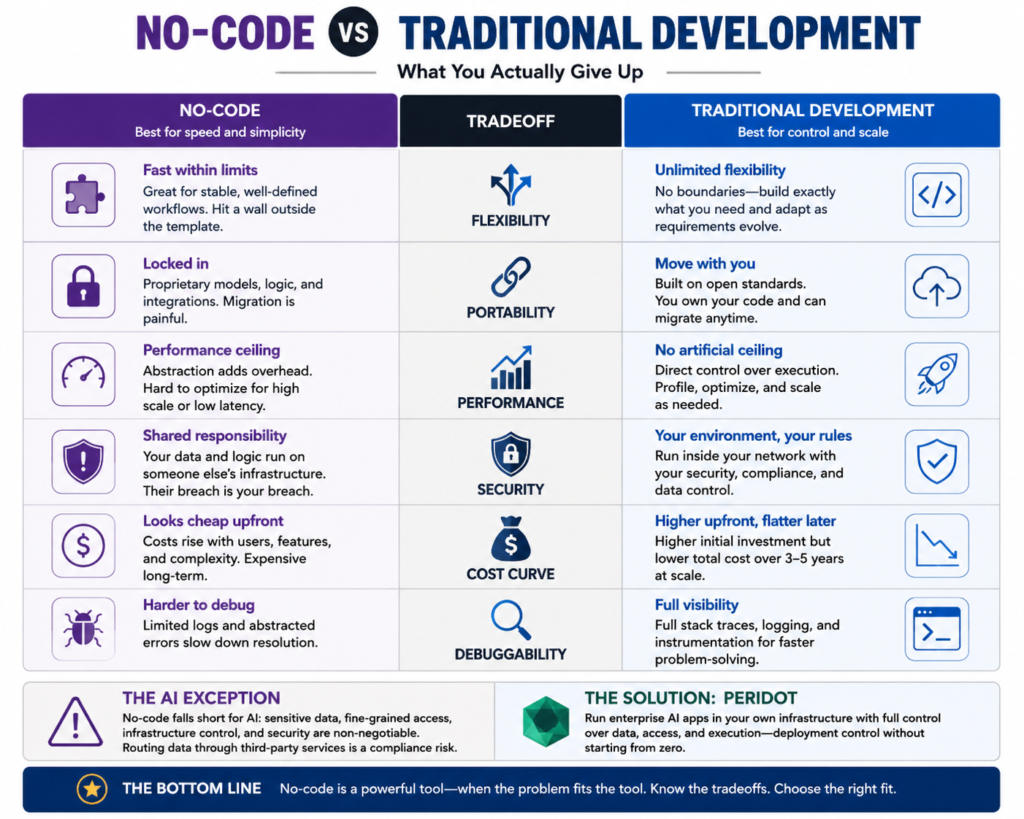
The Six Tradeoffs That Actually Matter
Flexibility. No-code platforms are fast inside their lanes. The moment a business requirement falls outside the template, you hit a wall. Traditional development has no such boundary — it’s slower, but the solution space is the entire language specification. For stable, well-understood workflows, no-code wins on speed. For anything that needs to evolve with your organization’s specific logic, you will eventually find yourself building workarounds on top of workarounds.
Portability. What you build in a no-code environment typically belongs to that environment. The data models, the workflow logic, the integration configurations — they live in a proprietary layer. If the vendor raises prices, gets acquired, or discontinues a feature, your migration path is painful. Traditional code, particularly when built on open standards, moves with you. That’s not a trivial distinction for a five-year infrastructure commitment.
Performance ceiling. No-code abstractions trade raw performance for accessibility. That’s an acceptable tradeoff for internal tools with light usage. It becomes a problem when you’re running high-frequency transactions, processing large datasets, or deploying AI models that need consistent low-latency response. The abstraction layer adds overhead you cannot tune away. Traditional development gives you direct control over execution — you can optimize, profile, and cut the fat. A no-code application builder cannot.
Security posture. This is where the conversation changes for enterprise teams. No-code platforms operate on a shared-responsibility model that often means your application logic, your data connections, and sometimes your data itself run inside someone else’s infrastructure. For most back-office tools, that’s manageable. For applications handling regulated data — healthcare records, financial information, customer PII — the security surface becomes a compliance problem. The platform’s certifications are not your certifications. Their breach is still your breach.
Cost curve. No-code looks cheap at the start. Seat-based pricing, fast deployment, no senior developer salaries in the initial budget line. But no-code costs scale with usage and complexity in ways that aren’t obvious in year one. As you add users, integrations, and edge cases, you add seats, premium features, and support tiers. Traditional development has higher upfront cost but a flatter long-term curve — once it’s built, it’s built. For anything expected to run at scale beyond 18 months, run the five-year total cost comparison before you decide.
Debuggability. When something breaks in a no-code platform, your debugging surface is whatever the vendor exposes to you. Error logs, if they exist, are often abstracted into user-friendly language that strips out the information you actually need. Traditional development gives you the full stack trace, the ability to add instrumentation, and the ability to reproduce the failure in isolation. In production environments where mean time to resolution is a business metric, this gap matters more than most teams anticipate.
Where No-Code Earns Its Place
None of the above means no-code is wrong for every use case. Internal tooling, rapid prototyping, departmental workflows with clear scope — these are legitimate no-code territory. The speed advantage is real. The reduced dependency on engineering bandwidth is real.
The mistake is treating a no-code application builder as a universal answer rather than a specific tool. When the tool fits the problem, use it. When it doesn’t, recognizing the mismatch early saves considerably more time than the initial speed gain ever delivers.
The place where no-code most consistently fails enterprise teams is AI. Building AI applications — whether that’s retrieval-augmented generation, intelligent document processing, or model-backed workflows — requires configuration depth, infrastructure control, and security architecture that no-code platforms weren’t built to provide.
The AI Exception That Changes the Calculus
Enterprise AI applications have requirements that expose every weakness in the no-code model simultaneously. They touch sensitive data constantly. They require fine-grained access control at the model and data level. They need to run inside your network perimeter, not routed through a vendor’s cloud. And they fail in ways that are subtle, hard to reproduce, and consequential.
A no-code application builder that connects to a third-party AI service routes your prompts, your context data, and potentially your documents through infrastructure you don’t own. For a regulated industry — insurance, healthcare, financial services, government — that’s not a gray area. That’s an audit finding waiting to be written.
This is the precise problem Peridot was built to solve. When your AI applications need to run inside your own infrastructure with full control over data, access, and execution, you need something that gives you the deployment control of traditional development without starting from zero. Peridot runs in your environment, under your security policies, with your identity and access management in place — not as a managed service calling home to someone else’s servers.
The difference isn’t about preference for one development model over another. It’s about whether the platform you choose can actually satisfy the security requirements your legal, compliance, and security teams will put in front of it.
Making the Call
The right framework for this decision is simpler than most vendor comparisons suggest. Ask what happens when your requirements outgrow the platform. Ask who owns the data and where it lives at rest and in transit. Ask what your migration path looks like if the vendor relationship changes. Ask whether a security audit of the platform would pass your own standards.
For departmental tools and internal automation with limited data sensitivity, a no-code application builder is often the right answer. Fast, maintainable by non-engineers, cost-effective at modest scale.
For anything that touches regulated data, needs to run at enterprise scale, or involves AI models operating on sensitive content, the tradeoffs stack against you quickly. The initial speed gain does not compensate for the security exposure, the performance ceiling, and the vendor lock-in. Platforms like Peridot exist specifically because the no-code model cannot clear the bar that enterprise AI requires.
Speed is a real advantage. It is not the only advantage that matters, and for the decisions you will have to defend to a regulator or a board, it is rarely the most important one.