
Most no-code tools get sold to your business teams and then become your infrastructure problem — here’s how to evaluate them before that happens.
The market for no coding platform tools has matured fast. What started as drag-and-drop form builders has grown into a category where non-technical teams genuinely ship customer-facing products, internal ops tools, and data workflows without writing a line of code. That’s real. But the vendor pitches skip the part where scalability ceilings hit, exit costs surface, and AI workloads expose the gap between “built for demos” and “built for production.”
This guide cuts through that. Ten platforms, honest verdicts, scored on what IT directors and application owners actually care about: shipping speed, scalability ceiling, exit cost, and AI-readiness.
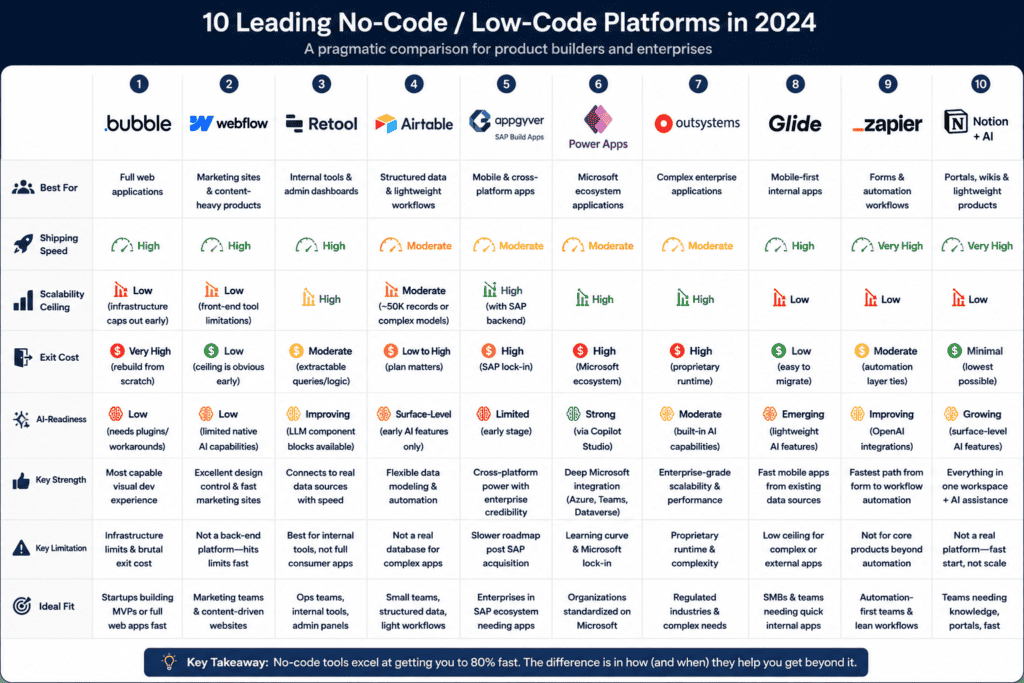
The Platforms, Ranked by Operational Reality
1. Bubble — The most capable visual development environment available. Shipping speed is high for web apps. Scalability ceiling is real: Bubble’s infrastructure caps out before enterprise workloads do, and migrating off it means rebuilding from scratch. Exit cost is brutal. AI-readiness is low without significant plugin workarounds.
2. Webflow — Excellent for marketing and content-heavy products. Fast to ship. But it’s a front-end tool wearing a platform costume. When your team asks it to handle business logic or data persistence beyond CMS basics, it stops pretending. Low exit cost because the ceiling is obvious early.
3. Retool — Purpose-built for internal tools connected to real databases. Shipping speed is high for operations dashboards and admin panels. Scalability ceiling is higher than most in this category. Exit cost is moderate — the logic lives in JavaScript-adjacent queries you can extract. AI-readiness is improving, with LLM component blocks now available.
4. Airtable — Genuinely good at structured data and lightweight workflow automation. The problem is teams treat it as a database when it’s a spreadsheet with good UX. Scalability ceiling hits around 50,000 records or complex relational models. Exit cost is low if you plan for it; high if you don’t. AI-readiness is surface-level.
5. AppGyver (SAP Build Apps) — Powerful for mobile and cross-platform apps. SAP’s acquisition brought enterprise credibility but slowed the roadmap. Shipping speed is moderate. Scalability ceiling is high when SAP backend is in play. AI-readiness is limited. Best fit: organizations already in the SAP ecosystem.
6. Microsoft Power Apps — The default choice for Microsoft shops, and a reasonable one. Deep integration with Azure, Teams, and Dataverse. Shipping speed is moderate — the learning curve is real even for “no-code.” Scalability ceiling is high. Exit cost is high because everything ties back to Microsoft connectors. AI-readiness is strong via Copilot Studio integrations.
7. OutSystems — Positioned as low-code, not no-code, but non-technical product owners can build meaningful applications with the right support structure. High scalability ceiling. High exit cost — proprietary runtime. AI-readiness is moderate. For regulated industries building complex applications, it’s a credible enterprise bet.
8. Glide — Rapid shipping for mobile-first internal apps pulled from Google Sheets or Airtable. The ceiling is low and visible. Exit cost is low. AI-readiness is emerging but lightweight. Good for proof-of-concept work that needs to graduate elsewhere.
9. Zapier Interfaces — Underrated for teams that live in Zapier already. Shipping speed for form-and-automation products is very high. Scalability ceiling is low for anything beyond automation-triggered workflows. Exit cost is moderate. AI-readiness is improving with OpenAI integrations baked into the automation layer.
10. Notion + AI — Not a no coding platform in the traditional sense, but teams are shipping client portals, wikis, and lightweight products on top of it. Shipping speed is very high. Scalability ceiling is low. Exit cost is minimal. AI-readiness is growing but still surface-level. Know what it is: a fast start, not a foundation.
The Scalability Ceiling Nobody Talks About in the Sales Call
Every platform above has a ceiling. The question isn’t whether you’ll hit it — it’s whether you’ll know you’re approaching it before the production incident that makes the decision for you.
The pattern is consistent: a team ships something useful on a no coding platform, adoption grows, data volume increases, and then the performance degradation starts. At that point, the organization has two bad options — pay for an expensive migration or throw engineering resources at a system that was never designed for them to touch.
The more dangerous version of this problem is AI workloads. When teams start connecting these platforms to LLM APIs — to summarize records, classify inputs, generate drafts — they’re running compute that no-code vendors didn’t architect for. Data leaves the platform, crosses third-party APIs, and lands in models with their own data retention policies. Most IT directors find out about this after it’s already happening.
This is where the deployment layer matters. Peridot sits between your no-code tooling and your AI workloads, running inference inside your own infrastructure so the data never leaves your perimeter. When Retool or Power Apps calls an AI function, that call can route through Peridot instead of a public API endpoint — same speed, full control.
How to Actually Choose
Stop optimizing for demo speed. The platform that ships a prototype in two hours is useful for exactly that. The platform you want to build on is the one where the exit path is documented before you start.
For internal tools with database requirements: Retool or Power Apps. For regulated industries needing enterprise deployment: OutSystems with a clear data governance layer. For fast web products where the ceiling won’t matter for 12 months: Bubble. For anything connecting to AI: assume the no coding platform vendor hasn’t solved the enterprise data problem and plan accordingly.
The teams that get this right evaluate three things before committing: what happens when we need a feature this platform can’t build, what does data residency look like when AI is in the loop, and what’s the realistic cost to migrate in 18 months. Most vendors won’t answer those questions directly. That’s the answer.
The Honest Enterprise Play
No-code is real and it works. Non-technical teams can ship products that matter. But “no-code” describes the build experience, not the operational requirements. You still need infrastructure that meets your compliance posture, data that stays where your contracts say it should, and AI execution that doesn’t route sensitive records through a vendor’s shared cloud.
Peridot is built for the moment when the no-code product works well enough that it needs to grow up — when AI is in the loop, data governance is non-negotiable, and the platform vendor’s hosted infrastructure isn’t an option your legal team will sign off on. The no coding platform your teams use to ship fast and the infrastructure your organization requires to operate aren’t in conflict. They just need a layer between them that takes both seriously.
The organizations that treat no-code as a deployment strategy rather than a prototyping tool are the ones that end up rebuilding everything in 24 months. The ones that treat it as a speed layer on top of serious infrastructure are the ones that actually win.