
TL;DR
Auditing AI usage across teams requires combining tool discovery, employee reporting, SaaS analysis, and policy review. Most organizations underestimate usage by 2–5x. A structured audit helps identify risks, enforce governance, and gain visibility into how AI is actually used across departments.
Introduction
Most enterprises don’t have an AI problem.
They have a visibility problem.
Teams are already using AI tools—across marketing, sales, engineering, and HR—but there’s no centralized understanding of:
- what tools are being used
- what data is being shared
- what risks are being introduced
Before governance, you need a clear audit of reality.
(If you haven’t mapped all tools yet, start with this guide on discovering AI tools across your enterprise.)
What an AI Usage Audit Actually Means
An AI audit is not a compliance exercise.
It’s a ground truth exercise.
You are trying to answer:
- Which AI tools are being used across teams?
- Who is using them?
- What data is being input into these tools?
- Which tools are approved vs unapproved?
Without this, any governance policy is guesswork.
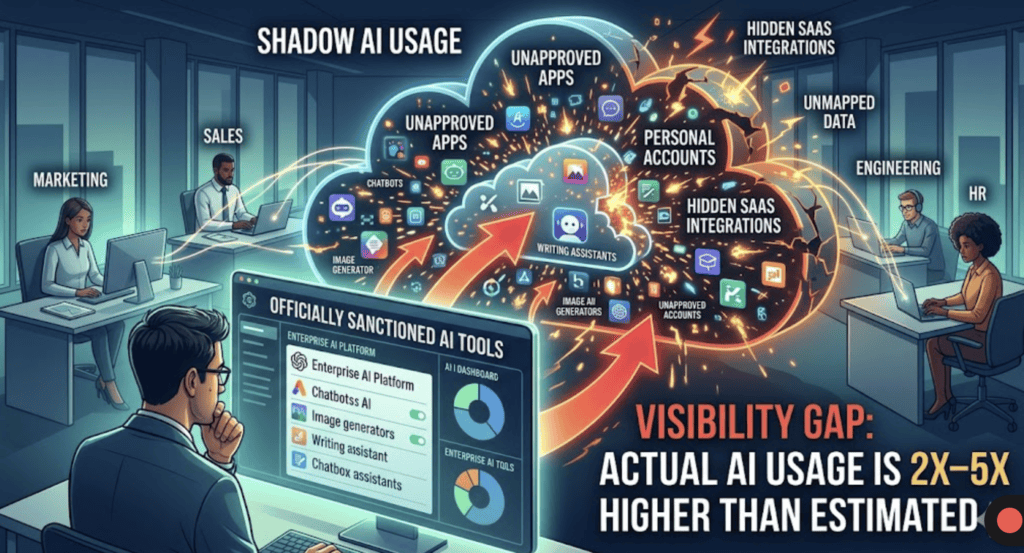
In our analysis of Shadow AI report across 423 companies, we found that most organizations lack visibility into AI usage and data flow.
Step-by-Step: How to Audit AI Usage Across Teams
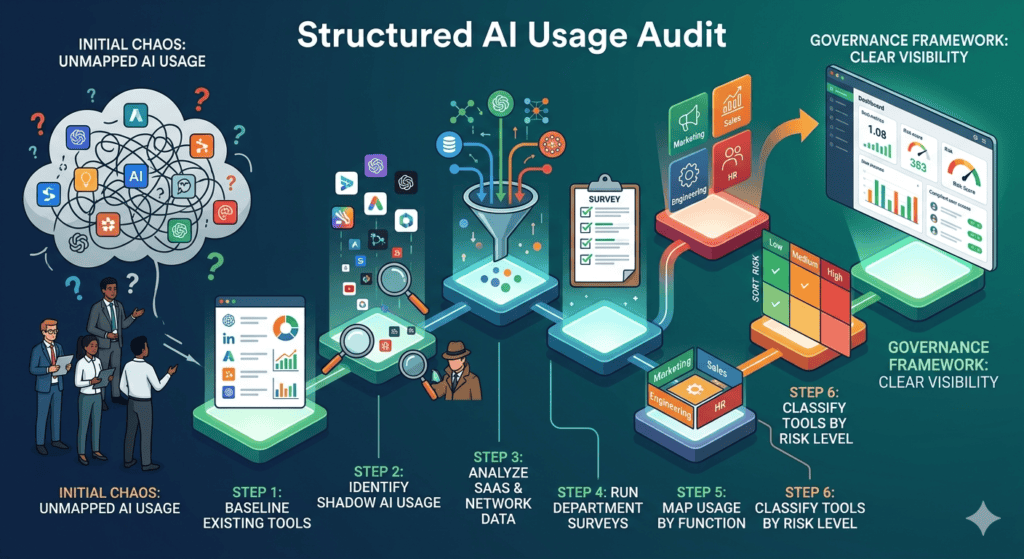
1. Create a Baseline of Known AI Tools
Start with what you already know:
- Approved enterprise AI tools
- Tools embedded in existing SaaS platforms
- Tools officially rolled out by IT
This gives you your “sanctioned layer”
2. Identify Shadow AI Usage
This is where the real audit begins.
Look for:
- Free AI tools used without approval
- Personal accounts accessing AI systems
- Tools bypassing procurement
Most enterprises underestimate this layer significantly.
(We cover detection methods in detail in our shadow AI guide.)
3. Analyze SaaS and Network Data
Use available data sources:
- SaaS management platforms
- Network logs and domain access
- Browser activity tracking (if available)
Focus on identifying:
- usage frequency
- data flow patterns
- high-risk tools
4. Run Department-Level Surveys
You won’t find everything through logs.
Ask teams directly:
- What AI tools do you use weekly?
- What tasks do you use them for?
- What data do you input?
You’ll uncover:
- niche tools
- workflow-specific usage
- hidden dependencies
5. Map Usage by Function
Break down findings by department:
- Marketing → content, research, campaign generation
- Sales → emails, prospecting, call summaries
- Engineering → code generation, debugging
- HR → resume screening, candidate analysis
This reveals:
- where adoption is highest
- where risk is concentrated
6. Classify Tools by Risk Level
Not all tools are equal.
Create categories:
- Low risk → internal productivity tools
- Medium risk → tools handling internal data
- High risk → tools processing customer or sensitive data
This becomes the foundation for governance.
AI Usage & Risk Statistics
- 75% of knowledge workers use AI tools at work (Microsoft Work Trend Index)
- 78% of AI users bring their own tools (Cisco)
- Only ~30% of organizations have formal AI governance policies (McKinsey)
The gap between usage and oversight is massive.
What We See in Real Enterprise Environments
Patterns are consistent:
- AI adoption is always bottom-up
- IT discovers usage late
- Most companies underestimate usage by 2–5x
The biggest mistake:
Treating AI audits as a one-time exercise
In reality:
- AI usage evolves weekly
- New tools appear constantly
- Risk profiles change fast
Audits need to become continuous.
How Peridot Helps
Manual audits don’t scale.
Tools like Peridot provide continuous visibility into AI usage across teams—tracking tools, usage patterns, and risk exposure in real time.
Instead of periodic audits, organizations can move to always-on monitoring and governance.
FAQ
How often should you audit AI usage?
At minimum quarterly, but continuous monitoring is ideal as AI usage evolves rapidly.
What is the biggest challenge in AI audits?
Identifying shadow AI usage—tools used without approval or visibility.
Can SaaS tools hide AI usage?
Yes. Many platforms embed AI features that may not be centrally tracked.
Who should own AI audits?
Typically a combination of IT, security, and governance teams.
Tools like Peridot are designed to give enterprises real-time visibility into AI usage across teams—without relying on manual audits or surveys.
Instead of guessing, organizations can continuously monitor AI activity, identify risks, and enforce policies from a single system.
Pingback: How to Discover All AI Tools Used Across Your Enterprise - Peridot Blog
Pingback: How to Track AI Tool Usage Across Employees and Departments - Peridot Blog
Pingback: We Analyzed Enterprise AI Usage: What 429 Respondents Revealed - Peridot Blog
Pingback: AI Tool Sprawl: How to Identify and Measure It in Your Organization - Peridot Blog