
TL;DR
Tracking AI tool usage across employees and departments requires continuous monitoring of tools, users, and data flows. Most enterprises rely on incomplete snapshots, missing the majority of actual usage. Effective tracking combines SaaS visibility, network data, and user-level insights to maintain control over AI adoption. You can grab the Shadow AI Benchmark Report to review the details.
In our benchmark shadow AI analysis of 423+ companies (enterprises over 5000 employees) and 23 interviews, we found that most organizations lack visibility into AI usage and data flow.
Introduction
Most enterprises don’t struggle with AI adoption.
They struggle with tracking it.
Once AI tools enter the organization, usage spreads quickly:
- Different teams adopt different tools
- Employees use personal accounts
- AI features get embedded inside existing software
Very quickly, you lose track of:
- who is using what
- how often tools are used
- what data is being shared
Discovery tells you what exists.
Tracking tells you what’s actually happening.
(If you haven’t identified your tools yet, start with discovering all AI tools used across your enterprise.)
What Tracking AI Usage Actually Means
Tracking AI usage is not just counting tools.
It requires understanding:
- Which employees are using AI tools
- How frequently they are used
- What workflows depend on AI
- What data is being input and processed
Without this, organizations operate in a false sense of control.
Why Tracking AI Usage is Critical
AI usage is dynamic.
Unlike traditional software:
- New tools appear constantly
- Usage patterns change weekly
- Risk exposure evolves over time
Without tracking:
- Governance policies become outdated
- Security teams miss emerging risks
- Compliance gaps go undetected
Tracking turns static visibility into continuous awareness.
Step-by-Step: How to Track AI Tool Usage
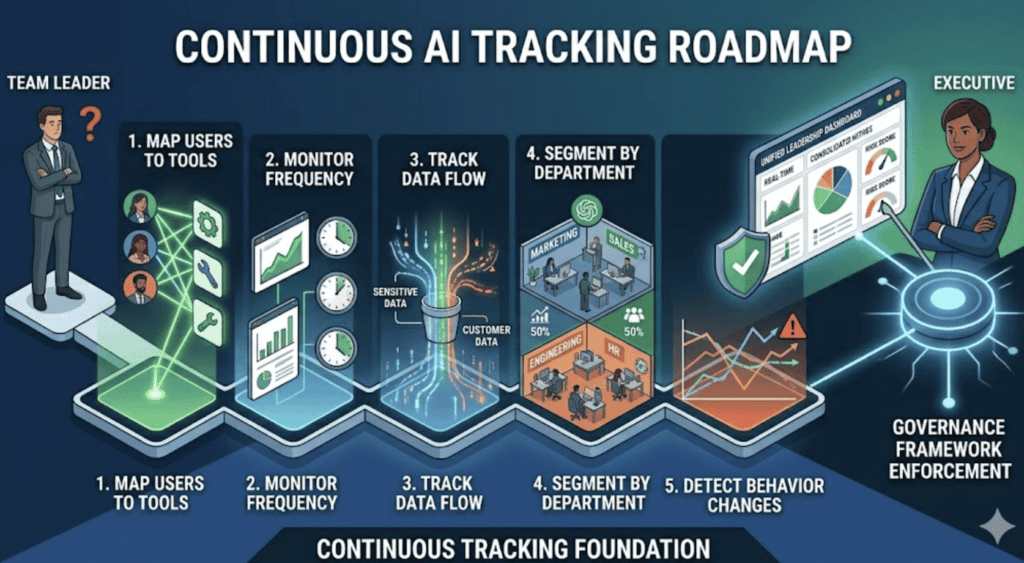
1. Map Users to Tools
Start by connecting:
- employees
- tools they use
- frequency of usage
This gives you a basic user-to-tool relationship map
2. Monitor Usage Frequency and Behavior
Track:
- how often tools are used
- which teams rely on them most
- spikes in usage
Patterns matter more than one-time activity.
3. Track Data Interaction Points
This is critical.
Identify:
- what data is being entered into AI tools
- whether it includes sensitive or customer data
- where that data flows
This is where most enterprise risk exists.
4. Segment Usage by Department
Break usage down:
- Marketing → content, research
- Sales → outreach, automation
- Engineering → development, debugging
- HR → hiring, screening
This helps identify:
- concentration of usage
- concentration of risk
5. Detect Changes Over Time
Tracking is not static.
Look for:
- new tools appearing
- sudden increases in usage
- shifts in behavior across teams
Change = signal.
6. Connect Tracking to Governance
Tracking without action is useless.
Use insights to:
- update approved tool lists
- enforce policies
- reduce risk exposure
(For structured audits, see how to audit AI usage across teams.)
AI Usage & Tracking Statistics
- 75% of knowledge workers use AI tools regularly (Microsoft)
- 78% bring their own AI tools (Cisco)
- Most organizations underestimate AI usage by 2–5x
Tracking gaps are the norm—not the exception.
What We See in Real Enterprise Environments
Across companies:
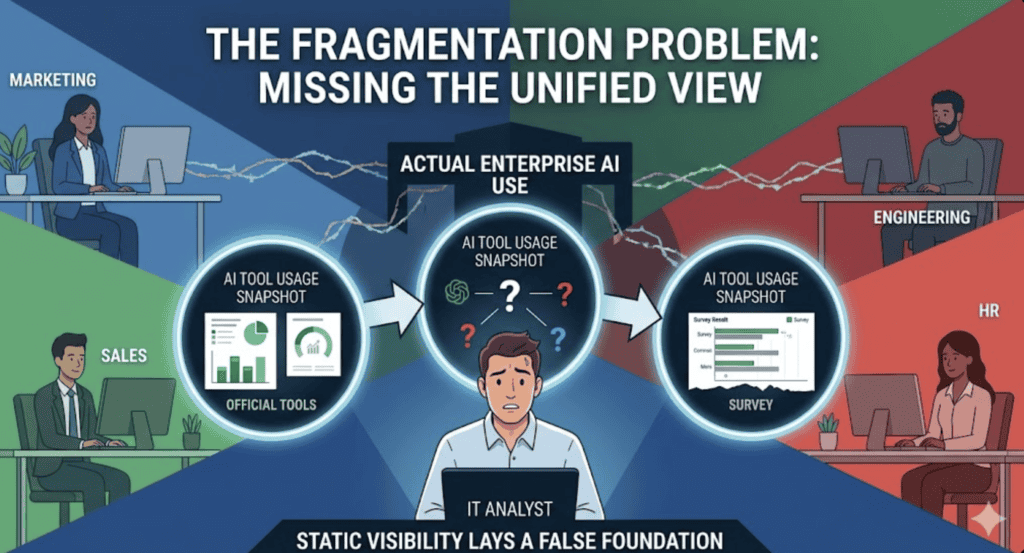
- Tracking is usually fragmented across tools
- No single system provides full visibility
- Most teams rely on periodic audits instead of continuous monitoring
The result:
Leadership believes AI usage is controlled—but it isn’t.
The biggest gap is not discovery.
It’s ongoing tracking.
How Tracking Connects to Shadow AI and Governance
Tracking is what exposes:
- shadow AI usage
- policy violations
- emerging risks
Without tracking:
- shadow AI remains invisible
- governance becomes reactive
- risk accumulates silently
(For more on hidden usage, see what shadow AI is and how to detect it.)
How Peridot Helps
Tracking AI usage manually does not scale.
Tools like Peridot provide continuous visibility into who is using which AI tools, how they are being used, and where risks exist—across all teams.
Instead of relying on periodic snapshots, organizations can move to real-time tracking and control.
FAQ
How do enterprises track AI usage?
Through a combination of SaaS monitoring, network analysis, and user-level insights.
Why is tracking different from discovery?
Discovery identifies tools. Tracking monitors how those tools are used over time.
What is the biggest risk of not tracking AI usage?
Unnoticed data exposure, compliance violations, and uncontrolled tool adoption.
Should tracking be continuous?
Yes. AI usage changes rapidly, making continuous monitoring essential.
Pingback: How to Discover All AI Tools Used Across Your Enterprise - Peridot Blog
Pingback: AI Tool Sprawl: How to Identify and Measure It in Your Organization - Peridot Blog
Pingback: We Analyzed Enterprise AI Usage: What 429 Respondents Revealed - Peridot Blog