
Choosing an enterprise app development platform is not a technical decision. It is a business decision that happens to have technical consequences.
Most founders approach it the wrong way: they read feature comparisons, watch demo videos, and pick the platform that feels most impressive. Then, six months later, they hit the ceiling, start researching migration, and discover that the cost of switching is higher than the cost of choosing correctly the first time.
This guide is a decision framework, not a feature comparison. Answer the questions. Follow the logic. Commit to a platform.
Why platform selection matters more than most founders realize
Three specific failure modes happen when founders choose the wrong platform:
Failure mode 1 — Early ceiling, late discovery. The platform handles everything fine until the moment it doesn’t. Performance degrades above a certain user count. A critical feature isn’t possible in the platform’s logic model. Migration under growth pressure is exponentially more expensive than migration before launch.
Failure mode 2 — Lock-in at the worst moment. The founder has invested six months of building. The platform raises its prices by 3x, gets acquired, or shifts its product direction. Migration now means rebuilding six months of work. The sunk cost keeps the founder on a platform that no longer serves them.
Failure mode 3 — Security gap that kills the enterprise deal. A promising enterprise prospect asks standard IT questions — data residency, credential isolation, audit logs — and the platform can’t answer them. The deal stalls or dies. This failure mode is increasingly common as enterprise buyers become more sophisticated about AI application security.
All three are avoidable. The framework below is designed to avoid them.
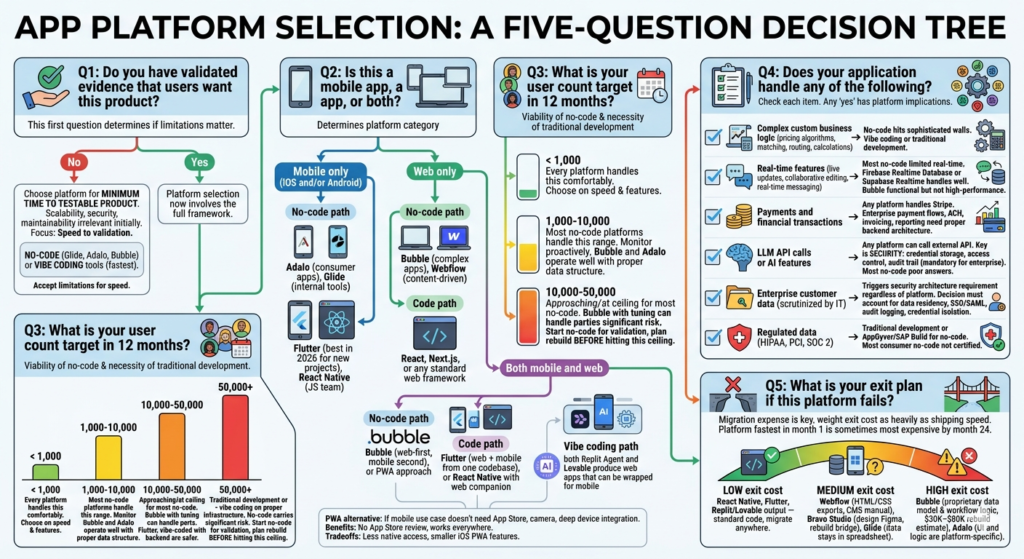
The decision framework: five questions in order
Work through these questions in sequence. Each one narrows the field.
Question 1: Do you have validated evidence that users want this product?
This is the first question because it determines whether platform limitations matter at all right now.
If no: Choose the platform that minimizes time to a testable product. Scalability, security architecture, and long-term maintainability are irrelevant until you have evidence that users will show up. No-code (Glide, Adalo, Bubble) or vibe coding tools (Peridot, Replit) get you to validation fastest. Accept platform limitations in exchange for speed.
If yes: Platform selection now involves the full framework. Continue to Question 2.
Question 2: Is this a mobile app, a web app, or both?
The answer determines the platform category.
Mobile only (iOS and/or Android):
- No-code path: Adalo for consumer apps, Glide for internal tools, Peridot for enterprise applications that require secure access
- Code path: Flutter (best in 2026 for new projects) or React Native (if your team knows JavaScript)
Web only:
- No-code path: Bubble for complex apps, Webflow for content-driven products, or Peridot for enterprise applications
- Code path: React, Next.js, or any standard web framework
Both mobile and web:
- No-code path: Bubble (web-first, mobile secondary) or a PWA approach
- Code path: Flutter (web + mobile from one codebase) or React Native with a web companion
- Vibe coding path: Replit, Peridot and Lovable produce web applications that can be wrapped for mobile
Progressive Web App (PWA) as an alternative: If your mobile use case doesn’t require App Store distribution, camera access, or deep device integration, a PWA — a web app that installs on a home screen and works offline — is worth considering. No App Store review, no distribution friction, works on every device. The tradeoff is lower access to native device capabilities and, on iOS, a smaller set of supported PWA features than Android.
Question 3: What is your user count target in 12 months?
This determines which no-code platforms are viable and whether traditional development is necessary.
Under 1,000 users: Every platform on the market handles this comfortably. Choose based on speed and feature fit.
1,000–10,000 users: Most no-code platforms handle this range. Monitor performance proactively. Bubble and Adalo both operate well here with proper data structure.
10,000–50,000 users: You are approaching or at the ceiling for most no-code platforms. Bubble with performance tuning can handle parts of this range. React Native, Flutter, or vibe-coded applications with proper backend infrastructure are safer.
50,000+ users: Traditional development or vibe coding on proper infrastructure. No-code platforms at this scale carry significant performance risk. If you start no-code for validation, plan the rebuild before you hit this ceiling — not when you’re already there.
Question 4: Does your application handle any of the following?
Work through each item. Any “yes” answer has platform implications.
Complex custom business logic (pricing algorithms, matching systems, routing engines, custom calculations) → No-code platforms can approximate some of this but hit walls on anything sophisticated. Vibe coding or traditional development.
Real-time features (live updates, collaborative editing, real-time messaging) → Most no-code platforms have limited real-time capability. Firebase Realtime Database or Supabase Realtime handles this well. Bubble’s real-time is functional but not high-performance.
Payments and financial transactions → Any platform handles Stripe integration. Enterprise payment flows, ACH, invoicing, and financial reporting need proper backend architecture.
LLM API calls or AI features → Any platform can call an external API. The question is not capability but security. Where are the credentials stored? Who has access to the prompts and responses? Is there an audit trail? For enterprise customers, these questions are mandatory. Most no-code platforms answer them poorly.
Enterprise customer data (any data that a large organization’s IT team will scrutinize) → Triggers a security architecture requirement regardless of which platform you choose. The platform decision needs to account for data residency, SSO/SAML support, audit logging, and credential isolation. This is where platform selection and security architecture become the same conversation.
Regulated data (HIPAA for health, PCI for payments, SOC 2 for enterprise SaaS) → Traditional development or AppGyver/SAP Build for no-code. Most consumer-grade no-code platforms are not certified for regulated data handling.
Question 5: What is your exit plan if this platform fails?
Every platform eventually fails someone. Price increases, acquisitions, policy changes, deprecation. The question is not if you’ll ever need to migrate but how expensive it will be when you do.
Low exit cost platforms: React Native, Flutter, Replit/Lovable output — standard code, migrate anywhere.
Medium exit cost platforms: Webflow (HTML/CSS exports, CMS migration is manual), Bravo Studio (design in Figma, rebuild the bridge layer), Glide (data stays in spreadsheet).
High exit cost platforms: Bubble (proprietary data model and workflow logic, $30K–$80K rebuild estimate), Adalo (UI and logic are platform-specific).
If you’re building something with a five-year horizon: weight exit cost as heavily as shipping speed. The platform that ships fastest in month one is sometimes the most expensive platform by month 24.
The output: matching answers to platforms
Run your answers through this table:
| Q1 (Validated?) | Q2 (Platform type) | Q3 (User target) | Q4 (Special requirements) | Recommended path |
|---|---|---|---|---|
| No | Mobile | Any | None | Adalo or Glide |
| No | Web | Any | None | Bubble or Webflow |
| No | Either | Any | None | Vibe coding (Peridot/Lovable/Replit) |
| Yes | Mobile | <10K | None | Adalo or Flutter |
| Yes | Mobile | >10K | None | Flutter or React Native |
| Yes | Web | <10K | None | Bubble |
| Yes | Web | >10K | None | React/Next.js or Flutter |
| Yes | Either | Any | LLM APIs + Enterprise data | Vibe coding + Peridot |
| Yes | Either | Any | Regulated data | Traditional dev or AppGyver |
| Yes | Either | Any | Real-time at scale | Traditional dev |
The enterprise AI application case
It deserves a standalone section because it represents the fastest-growing platform selection failure in 2026.
The situation: a founder builds an AI-powered application — mobile or web — that calls LLM APIs with user data. The product works. An enterprise prospect expresses serious interest. The prospect’s IT security team asks five questions:
- Where does the data go when it hits the LLM API?
- Who stores the API credentials, and how are they isolated per customer?
- Is there an audit log of what data was sent to which model?
- Can this be deployed within our VPC boundary?
- Does this support our identity provider for SSO?
Most platforms — no-code and traditional alike — can’t answer questions 3, 4, and 5. The deal stalls.
Peridot was built specifically for this scenario. It’s an app development platform — it’s the security and deployment layer that sits above your application platform and answers the IT team’s questions. VPC deployment, per-customer credential isolation, audit trails, and SSO integration. If your platform selection process includes “we will eventually sell to enterprise and the product calls LLM APIs,” Peridot belongs in the architecture conversation before the first line of code is written.
The framework in one sentence
Choose the platform that gets you to your first five validated users fastest — and plan the migration before you need it, not when you’re already under pressure.
Also read
How to Develop an Enterprise Mobile Application in 2026 with Vibe Coding: The Honest Guide
Develop a Enterprise Mobile App Without an Agency: 7 Paths and Their Real Costs
The 8 Best Mobile App Development Platforms for Non-Engineers
How to Choose an Enterprise App Development Platform: The Decision Framework
Mobile App Software Development: In-House vs No-Code vs AI-Assisted
Best Mobile App Creation Software for Solo Founders in 2026
Mobile App Building Software: What the Benchmarks Actually Show