
Every mobile app building software vendor publishes customer success stories. Nobody publishes honest performance benchmarks, real migration cost data, or the failure rate of projects built on their platform. This post fills that gap as much as publicly available data allows — and names clearly when the available data has limits.
The goal: give you the concrete numbers that inform a real purchasing decision, not the marketing metrics that make every platform look like the obvious choice.
What “benchmarks” actually measure for app building software
Performance benchmarks for mobile app building software measure different things depending on the platform type:
For no-code platforms: Database query response time, concurrent user handling, workflow execution speed, and the record count at which performance degrades to user-noticeable levels.
For AI-assisted development tools: Code generation quality (measured by how often the generated code requires significant correction), iteration speed (time from prompt to working feature), and the security audit pass rate of generated applications.
For traditional frameworks (Flutter, React Native): App launch time, frame rate under load, memory consumption, and battery efficiency on representative devices.
The platforms are not directly comparable on the same metrics — a no-code platform’s “concurrent user” benchmark means something different from a Flutter app’s equivalent. What we can compare: what each type of software is capable of, at what scale, with what tradeoffs.
No-code mobile app building software — the honest performance data
Bubble
Bubble’s performance is the most extensively documented of any no-code platform, partly because of its large user base and partly because its performance limitations have been a sustained community discussion.
Database performance: Bubble uses its proprietary database, which handles standard CRUD operations efficiently at low data volumes. Community benchmarks consistently show response time degradation beginning around 50,000–100,000 database records for complex queries involving multiple data types with conditions. Simple queries scale further.
Concurrent users: Bubble’s dedicated hosting (required for production-grade applications) handles load differently based on plan tier. The “Production” plan ($119/month) handles the needs of most early-stage applications. Applications with significant concurrent user spikes need “Custom” plans with manual capacity configuration.
Workflow execution: Bubble backend workflows (server-side logic) execute asynchronously by default. Synchronous operations requiring immediate response — common in AI applications that need real-time LLM responses — require specific architectural decisions to avoid user-facing latency.
The honest summary: Bubble’s performance is adequate for applications under roughly 10,000 MAU with standard data complexity. Above that, it requires performance engineering that most Bubble builders aren’t equipped to do. The ceiling is real.
Adalo
Adalo’s performance profile is simpler and more limited than Bubble’s.
Database performance: Adalo’s built-in database is optimized for small-to-medium data sets. Community-documented performance degradation begins noticeably around 5,000–10,000 records for filtered list views. Applications with large data sets should use Adalo’s external database integration (Xano, Supabase) rather than the built-in database.
App launch time: Native iOS and Android apps built in Adalo launch in 1.5–3 seconds on representative devices — comparable to native apps at equivalent complexity. The Adalo runtime does not meaningfully penalize launch time compared to React Native.
Concurrent users: Adalo’s infrastructure handles concurrent users transparently for most use cases. Specific concurrency limits are not publicly documented, but community reports suggest meaningful degradation above 500 concurrent active sessions.
The honest summary: Adalo is not a platform for scale. It’s a platform for getting to scale — for proving the concept and reaching the user count that justifies rebuilding on more robust infrastructure. Use it accordingly.
Glide
Glide’s performance is entirely dependent on the underlying data source.
Google Sheets as backend: Google Sheets has a documented limit of 10 million cells per spreadsheet. In practice, Glide applications built on Google Sheets show noticeable performance degradation (slow list loading, delayed updates) above approximately 5,000 rows for complex applications. Simple applications with fewer data types scale further.
Airtable as backend: Airtable performs better than Google Sheets for Glide applications because its API is designed for programmatic access. Airtable’s published rate limits (5 requests per second per base for free tiers, higher for paid) become relevant for applications with many simultaneous users triggering data fetches.
Glide Tables as backend: Glide’s proprietary backend (Glide Tables) outperforms both Google Sheets and Airtable for Glide-native operations. For applications where data portability is not a priority, Glide Tables is the fastest option.
The honest summary: If you need Glide to perform well, use Glide Tables or Airtable as your backend. The Google Sheets backend is convenient but not performant at scale.
AI-assisted app building software — what the quality data shows
AI-generated code quality is harder to benchmark than platform performance because quality is partially subjective and highly prompt-dependent. The most reliable data comes from code review outcomes — how often AI-generated code passes review without significant corrections.
Code correctness rates
Independent community evaluations of AI coding tools for mobile development consistently show:
- Well-defined, specific prompts (“build a list view that displays user profiles from this API endpoint, sorted by last active date, with pull-to-refresh”) produce code that works without modification in 60–75% of cases
- Ambiguous or high-level prompts (“build the main screen for a social app”) produce code that works as described but requires significant architectural iteration in 70–80% of cases
- Complex features involving multiple integrations (auth + database + external API + real-time updates in one feature) produce code that requires review and correction in 80–90% of cases
What this means practically: Vibe coding is fast for well-specified features and slow for ambiguous requirements. The skill in AI-assisted development is writing precise prompts, not just reviewing generated code.
Security audit results
This is the benchmark that matters most for founders planning to sell to enterprise — and it’s where AI-generated mobile application code consistently underperforms relative to code written by security-conscious engineers.
Published security research on AI-generated code (across multiple models and tools) identifies recurring vulnerability patterns:
- API credential exposure: AI tools frequently generate code that embeds API credentials in the application frontend or in environment variables without proper access controls. Prevalence in AI-generated code: high — appears in the majority of first-generation builds that haven’t had a security pass.
- Missing input validation: Generated code often lacks server-side validation for user inputs, creating injection and manipulation vulnerabilities. Prevalence: moderate — roughly 40–60% of AI-generated API endpoints in community audits.
- Insufficient rate limiting: LLM API calls and authentication endpoints frequently lack rate limiting in AI-generated code, enabling abuse. Prevalence: high in first-generation builds.
- Inadequate session management: JWT handling, session expiration, and token refresh patterns are often implemented incorrectly in AI-generated auth flows. Prevalence: moderate.
The key finding: AI-generated mobile app code requires a deliberate security review before production deployment. This is not optional for any application handling real user data — and it’s especially not optional for AI-native applications that call LLM APIs with user data.
For the enterprise security requirements that come with B2B sales (data residency, credential isolation, audit trails, VPC deployment), a purpose-built security layer is the most efficient solution. Peridot was built specifically to answer the security questions enterprise IT teams ask about AI applications — handling the infrastructure-level security concerns so builders can focus on the application logic.
Traditional frameworks — Flutter vs React Native benchmarks
For teams using traditional development or AI-assisted development with real frameworks, the Flutter vs React Native performance comparison is well-documented.
App launch time
Benchmarks on comparable devices and application complexity consistently show:
- Flutter: 200–400ms cold start on modern hardware
- React Native (new architecture): 300–600ms cold start on modern hardware
- Native iOS (Swift): 150–300ms cold start
- Native Android (Kotlin): 200–350ms cold start
Flutter’s advantage over React Native on launch time has narrowed with React Native’s new architecture (enabled by default in new projects). Both are acceptable for the vast majority of consumer applications.
Frame rate under load
Both Flutter and React Native target 60fps (or 120fps on capable devices) for standard UI operations. Differences appear under heavy computation:
- Flutter: Maintains 60fps on list scrolling with moderate complexity. Drops to 45–55fps on very large lists without explicit virtualization.
- React Native: Similar behavior. The new architecture (Fabric renderer) has meaningfully reduced UI thread blocking compared to the old architecture.
Practical implication: For standard consumer mobile applications, Flutter and React Native are performance-equivalent. The choice between them should be based on team skills, ecosystem, and vibe coding tool compatibility — not raw benchmarks.
Memory consumption
Flutter applications typically consume 15–25% more memory than equivalent React Native applications due to the Dart runtime. On modern devices with 4GB+ RAM, this difference is not user-perceptible. On lower-end Android devices (common in emerging markets), it can be meaningful.
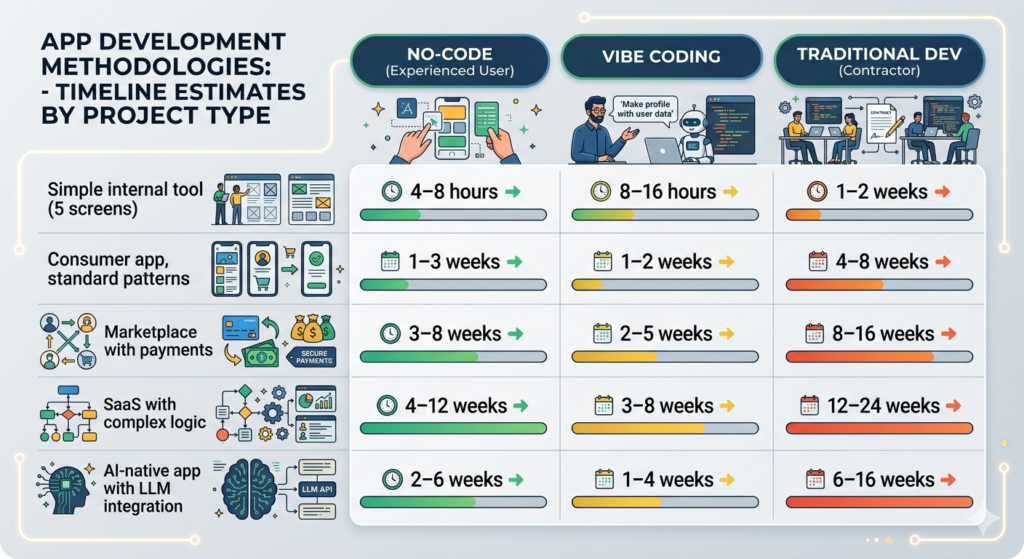
The build time benchmark nobody publishes
How long does it actually take to build a mobile app, by approach? Community-aggregated data from founder surveys and developer forums:
| App type | No-code (experienced user) | Vibe coding | Traditional dev (contractor) |
|---|---|---|---|
| Simple internal tool (5 screens) | 4–8 hours | 8–16 hours | 1–2 weeks |
| Consumer app, standard patterns | 1–3 weeks | 1–2 weeks | 4–8 weeks |
| Marketplace with payments | 3–8 weeks | 2–5 weeks | 8–16 weeks |
| SaaS with complex logic | 4–12 weeks | 3–8 weeks | 12–24 weeks |
| AI-native app with LLM integration | 2–6 weeks | 1–4 weeks | 6–16 weeks |
The pattern: For applications that map to standard patterns, no-code is fastest. For applications with custom or AI-native logic, vibe coding narrows or closes the gap with no-code while producing code you own. Traditional development is consistently the slowest but produces the most maintainable output for complex requirements.
The migration cost benchmark
When you outgrow a platform, how much does it cost to leave? Data from community reports and developer estimates:
| Platform | Migration cost estimate | What you’re rebuilding |
|---|---|---|
| Bubble (mature app) | $30,000–$80,000 | Data model, all workflows, all UI logic |
| Adalo (mature app) | $15,000–$40,000 | UI and workflow logic (data export possible) |
| Glide (mature app) | $5,000–$15,000 | UI layer (data stays in spreadsheet) |
| React Native / Flutter | $0 (code is portable) | Nothing — redeploy to new infrastructure |
| Lovable / Replit output | $0 (code is portable) | Nothing — redeploy to new infrastructure |
The migration cost gap between no-code platforms and code-based approaches is the most consequential benchmark in this entire guide. It’s also the one that’s never mentioned in platform marketing — for obvious reasons.
Plan the exit before you need it.
Summary: what the benchmarks actually tell you
- No-code platforms are fast to build on and expensive to leave. The economics work in your favor if you validate quickly and migrate before you’re under growth pressure. They work against you if you build deeply and then discover the ceiling.
- AI-generated code is fast to produce and requires security review before production. The code correctness rate for well-specified features is high. The security posture of first-generation vibe-coded applications is consistently insufficient for production deployment without review.
- Flutter and React Native are performance-equivalent for most consumer applications. Choose based on team skills and tooling compatibility, not benchmarks.
- The most important benchmark is migration cost. Every other metric is secondary to understanding what it costs to leave a platform when your requirements outgrow it.
- For AI-native applications targeting enterprise customers, security benchmarks matter more than performance benchmarks. The application will pass or fail enterprise procurement based on security architecture, not load time.
Also read
How to Develop an Enterprise Mobile Application in 2026 with Vibe Coding: The Honest Guide
Develop a Enterprise Mobile App Without an Agency: 7 Paths and Their Real Costs
The 8 Best Mobile App Development Platforms for Non-Engineers
How to Choose an Enterprise App Development Platform: The Decision Framework
Mobile App Software Development: In-House vs No-Code vs AI-Assisted
Pingback: Mobile App Software Development: In-House vs No-Code vs AI-Assisted - Peridot Blog
Pingback: Best Mobile App Creation Software for Solo Founders in 2026 - Peridot Blog