
Platform selection is the decision that shapes everything that follows — the speed of your build, the ceiling you’ll hit, the cost of migrating when you outgrow it, and whether your app can pass enterprise security review. Most comparison posts treat it as a feature checklist. This one treats it as a business decision.
Eight platforms. Honest assessments. No sponsored rankings.
How to read this comparison
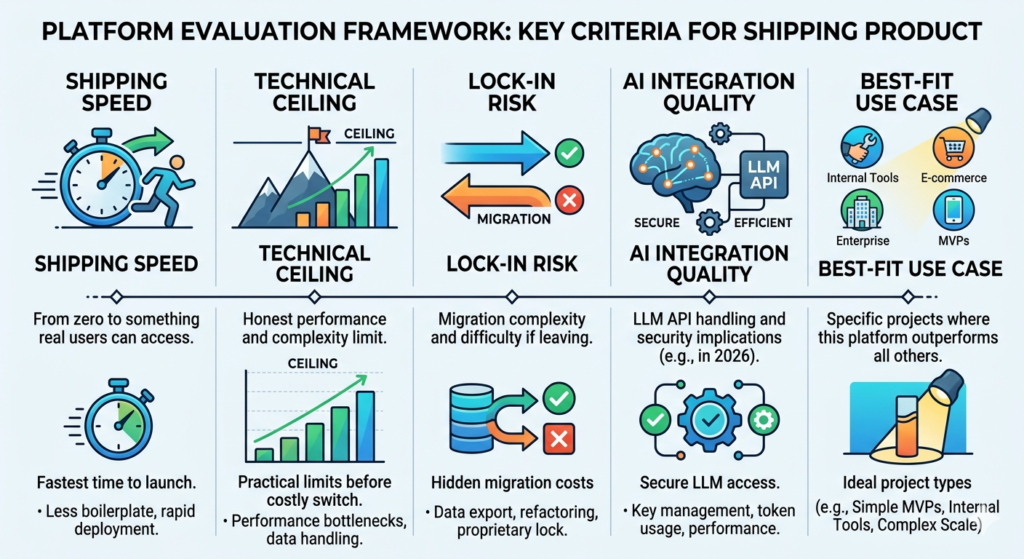
Every platform is evaluated on five criteria that matter to someone actually shipping a product:
Shipping speed — How fast from zero to something a real user can access?
Technical ceiling — The honest performance and complexity limit. Not the platform’s claimed capacity — the practical limit where building on it starts costing you more than switching would have.
Lock-in risk — What migration looks like if you need to leave. This is the question every platform avoids answering in its own documentation.
AI integration quality — In 2026, most valuable mobile apps call an LLM API at some point. How well does the platform handle it, and what are the security implications?
Best-fit use case — The specific type of project where this platform outperforms everything else.
1. Flutter (with Dart)
Flutter is Google’s cross-platform framework — not a no-code platform, but the dominant technical choice for new mobile app development in 2026 and worth understanding even if you plan to hire engineers to use it.
Shipping speed: Medium. A developer with Flutter experience ships fast. A first-time Flutter learner needs 4–6 weeks before velocity increases.
Technical ceiling: Effectively unlimited. Flutter compiles to native code for iOS, Android, web, and desktop. Performance is close to native on all platforms.
Lock-in risk: Low. Flutter produces standard Dart code. Migrating the codebase to a different framework is engineering work, not platform abandonment.
AI integration quality: Excellent. Flutter applications communicate with LLM APIs via standard HTTP — no platform restrictions, credentials managed in your own backend.
Best-fit use case: Any non-trivial mobile application where you have access to a developer (human or AI-assisted) and expect to scale. The vibe coding tools are most effective with Flutter in 2026 — Cursor and Replit Agent both produce better Flutter output than any other mobile framework.
Honest weakness: You need to either hire a Flutter developer or commit to vibe coding the build yourself. This is not a no-engineer path.
2. React Native (with Expo)
The most widely deployed cross-platform mobile framework. React Native uses JavaScript — the most common programming language in the world — which means larger talent pools, more community resources, and better integration with web development teams.
Shipping speed: Fast with Expo managed workflow. An experienced team ships a React Native MVP in 3–6 weeks.
Technical ceiling: High for most applications. Complex animations and heavy graphics processing can require dropping into native modules, which requires platform-specific expertise.
Lock-in risk: Low. Standard JavaScript codebase. Expo adds some abstraction but code is portable.
AI integration quality: Excellent. Standard HTTP calls to LLM APIs. No platform restrictions.
Best-fit use case: Applications where you have a web development team who needs to ship mobile without learning a new paradigm, or where web and mobile share business logic.
Honest weakness: React Native has accumulated technical debt over its history. New projects should use Expo with the new architecture enabled. Teams inheriting old React Native codebases often spend more time managing the framework than building features.
3. Bubble
The no-code platform with the highest technical ceiling. Bubble uses a proprietary visual programming environment to define data models, workflows, and UI simultaneously.
Shipping speed: Slow to start. The Bubble mental model takes 3–7 days to internalize. After that, moderately fast — roughly equivalent to a junior developer for standard CRUD applications.
Technical ceiling: 10,000–50,000 MAU before performance tuning becomes intensive work. Complex relational queries degrade faster. Real-time features are limited.
Lock-in risk: High. Bubble’s data model and workflow logic are entirely proprietary. Migrating means rebuilding the application from scratch. Budget $30,000–$80,000 for migration if it ever becomes necessary.
AI integration quality: Adequate for demos, concerning at scale. Bubble’s API connector allows LLM API calls, but credentials are stored at the platform level. For enterprise applications where data isolation matters, this architecture raises flags.
Best-fit use case: SaaS MVPs, marketplaces, and complex web applications where you need maximum no-code flexibility and are willing to accept lock-in risk during the validation phase.
Honest weakness: Bubble’s pricing at scale is not startup-friendly. The jump from lower tiers to production-grade hosting is significant. Model the full cost at your target user count before committing.
4. Adalo
The strongest native mobile app builder in the no-code category. Adalo produces actual iOS and Android applications that pass App Store review — not PWAs, not hybrid wrappers.
Shipping speed: Moderate. A week to a working product for a motivated first-time builder.
Technical ceiling: Low-medium. Adalo’s database performance noticeably degrades above a few thousand records. Real-time sync is limited. Custom business logic is constrained to the platform’s built-in actions.
Lock-in risk: High. Adalo’s backend is proprietary. Data export is available but UI logic and workflow automation are Adalo-specific.
AI integration quality: Limited. External API calls are possible but the integration experience is manual and clunky. Not recommended for AI-native products.
Best-fit use case: Consumer mobile apps with standard patterns — booking, directory, community, marketplace basics — where the App Store presence matters and the user base will stay below 10,000.
Honest weakness: Adalo’s development velocity has been inconsistent. The platform has shipped fewer major updates in the past 18 months than its closest competitors. Evaluate the platform’s current trajectory before committing to it for anything with a multi-year horizon.
5. Glide
Glide turns existing data — Google Sheets, Airtable, Excel — into mobile and web applications with a visual builder. The fastest path to a working product if your data already exists in a spreadsheet.
Shipping speed: Fastest on this list for its target use case. Hours, not days, for simple applications.
Technical ceiling: Low. Glide is a presentation layer over a spreadsheet. When data relationships get complex or record counts get high, the underlying spreadsheet becomes the bottleneck. Not designed for applications with complex business logic.
Lock-in risk: Low-medium. Your data stays in your spreadsheet. The UI logic is Glide-specific, but migrating data is not the catastrophic exercise it is with Bubble or Adalo.
AI integration quality: Limited. Glide AI components exist for simple use cases but are not suitable for serious AI product development.
Best-fit use case: Internal tools, client portals, and field team applications where the data already lives in a spreadsheet and the primary value is making that data accessible on mobile.
Honest weakness: Glide is not a general-purpose app builder. The moment you need features that don’t map to a spreadsheet data model, you’re fighting the tool. Know what it is before you start.
6. AppGyver / SAP Build Apps
The enterprise-grade no-code mobile platform. Free to use, backed by SAP, and designed from the ground up for applications that need to pass enterprise security review.
Shipping speed: Slow. The enterprise-grade tooling comes with enterprise-grade complexity. Expect a significant learning curve before productive development begins.
Technical ceiling: High. SAP’s infrastructure handles enterprise workloads. The platform supports complex integrations with enterprise backend systems including SAP itself.
Lock-in risk: Medium-high. SAP ecosystem integration is a double-edged sword. Deep integration is the value proposition; it’s also what makes migration expensive.
AI integration quality: Improving. SAP Build is actively adding AI components but the pace is enterprise-slow. More mature than most no-code platforms for enterprise AI security, less mature than dedicated AI platforms.
Best-fit use case: Internal enterprise applications, regulated industry tools, and applications where the primary buyer is a large organization that will conduct a formal security review before deployment.
Honest weakness: Most startup founders abandon AppGyver before shipping anything. The complexity is calibrated for enterprise teams with dedicated no-code developers. If your primary buyer isn’t enterprise, this platform is probably not the right starting point.
7. Bravo Studio
Bravo Studio occupies a unique position: it takes a Figma design and turns it into a functional native iOS and Android application. For design-led founders, this changes the development workflow entirely.
Shipping speed: Fast for Figma-native teams. Effectively zero learning curve for the design side; moderate learning curve for the data binding and API integration side.
Technical ceiling: Determined by the external API you connect, not by Bravo. The platform is a rendering layer — your backend is your ceiling.
Lock-in risk: Low-medium. Your design lives in Figma. Your data lives in your backend. Bravo is the bridge. Migrating means rebuilding the rendering layer, not the design or the data.
AI integration quality: Backend-dependent. Bravo surfaces whatever your API returns. Build an AI backend, and Bravo can display it.
Best-fit use case: Design-led founders, agencies that want to deliver native mobile apps from Figma deliverables, and applications where the visual experience is a primary differentiator.
Honest weakness: The Figma-to-app sync has edge cases. Design changes don’t always propagate cleanly. Budget time for sync debugging after significant design updates, especially around navigation and layout changes.
8. Peridot / Replit / Lovable (AI-native builders)
Not traditional platforms — these are AI-assisted development environments that produce real, exportable code from natural language descriptions. Included here because in 2026 they represent the most significant shift in mobile development for non-engineers.
Shipping speed: Fast for well-defined requirements. Variable for ambiguous briefs — the AI needs clear inputs to produce useful outputs.
Technical ceiling: None from the platform side. The generated code runs on any infrastructure. Your ceiling is the quality and maintainability of the generated codebase.
Lock-in risk: Zero. The output is standard code — React Native, Flutter, or web frameworks depending on the tool. You own it, can modify it, and can deploy it anywhere.
AI integration quality: Native. Both platforms are designed for AI-native product development. LLM API integration is a first-class pattern, not an afterthought.
Best-fit use case: Founders who want to own their code without writing it from scratch, AI-native applications, and anyone who has validated a concept with no-code and wants to rebuild on infrastructure they control.
Honest weakness: Vibe-coded applications require a security review before production deployment. The AI writes working code; it doesn’t default to security best practices. API credential management, input validation, rate limiting, and data isolation need deliberate attention. For AI-native apps targeting enterprise customers, a dedicated security layer like Peridot handles the VPC deployment, credential isolation, and audit infrastructure that makes enterprise deals possible without a six-month IT review process.
The selection matrix
| Your situation | Best platform | Why |
|---|---|---|
| Have a developer (or vibe coding) | Flutter or React Native | Highest ceiling, full code ownership |
| Need no-code SaaS/marketplace | Bubble | Best no-code ceiling for complex logic |
| Need native mobile, no engineer | Adalo | Genuine App Store output |
| Data already in spreadsheets | Glide | Fastest time to working tool |
| Selling to enterprise on day one | AppGyver / SAP Build | Compliance-first architecture |
| Design-first mobile product | Bravo Studio | Figma-native workflow |
| AI-native product, own the code | Replit or Lovable | Real code, zero platform lock-in |
| AI app for enterprise customers | Vibe coding + Peridot | Security layer enterprise IT approves |
The question every platform avoids answering
What does it cost to leave?
- Flutter / React Native: Low. Standard code, migrate to any infrastructure.
- Bubble: High. $30K–$80K rebuild estimate for a mature application.
- Adalo: High. Data export possible; UI and logic are platform-specific.
- Glide: Low-medium. Data stays in your spreadsheet.
- AppGyver: Medium-high. SAP ecosystem entanglement is real.
- Bravo Studio: Low-medium. Design in Figma, rebuild the bridge layer.
- Peridot / Replit / Lovable: None. You own the code.
Weight exit cost at the same priority as shipping speed. The platform that ships fastest in week one is not always the platform that serves you best in year two.
Also read
How to Develop an Enterprise Mobile Application in 2026 with Vibe Coding: The Honest Guide
Develop a Enterprise Mobile App Without an Agency: 7 Paths and Their Real Costs
The 8 Best Mobile App Development Platforms for Non-Engineers
How to Choose an Enterprise App Development Platform: The Decision Framework
Mobile App Software Development: In-House vs No-Code vs AI-Assisted
Best Mobile App Creation Software for Solo Founders in 2026
Mobile App Building Software: What the Benchmarks Actually Show
Pingback: How to Choose an Enterprise App Development Platform: The Decision Framework - Peridot Blog