
Solo founders face a version of the mobile app creation problem that team-based guides don’t address: you have limited time, limited budget, no engineering co-founder, and you need to ship something real without building a dependency on a developer you can’t yet afford. The software you choose has to work with those constraints — not around them.
This guide covers mobile app creation software evaluated specifically for the solo founder context. Not “best for enterprises.” Not “best for agencies.” Best for one person who needs to ship.
The solo founder’s constraints
Before the software rankings, the honest constraints:
Time: Solo founders building a mobile app are doing it alongside everything else. You are not spending eight hours a day in the builder. Realistically: 10–20 focused hours per week. The software needs to reward interrupted work — sessions you can pick up and put down without losing context.
Budget: Pre-revenue or early-revenue. The cost model matters. Platforms with low starting costs and steep scaling costs are a trap — you optimize for today and get surprised at the worst moment. Understand the full cost curve before committing.
Support dependency: When something breaks on a platform you’re using alone, there’s no internal team to ask. Support quality and community documentation are first-class criteria, not afterthoughts.
Decisions you’ll make alone: No code review, no architecture partner, no one to catch your mistakes. The software should have guardrails that protect you from common errors rather than giving you unlimited rope to hang yourself with.
The ranking
1. Glide — best for the first app, fastest to useful
Glide is the right starting point for most solo founders building their first mobile app because it removes more setup friction than any other tool on this list. Connect a Google Sheet or Airtable base, map your data to Glide’s visual components, and you have a working app in hours.
What it does well for solo founders: The Google Sheets integration means your data lives somewhere you already know — spreadsheet logic is accessible, editable outside the app, and easy to inspect when something goes wrong. The template library is genuinely useful, not just demo material. The mobile-first interface builder requires less design skill than alternatives.
What to watch: Glide is a view layer over a database. The moment your data needs to be relational in a way spreadsheets don’t handle naturally, or the moment you need workflow logic beyond basic filters and sorts, you’re approaching the tool’s limit. Know what that limit is before you build past it.
Pricing: Free plan available. Paid plans from $25/month. Scales with users and data rows.
Best for: Internal tools, simple client portals, directory apps, and any use case where your data already exists in a spreadsheet.
2. Adalo — best for consumer mobile apps without a developer
If you need an app in the App Store or Google Play — an actual native mobile application, not a PWA or web wrapper — Adalo is the strongest no-code option for solo founders. It produces genuine iOS and Android apps that pass App Store review.
What it does well for solo founders: The component-based builder is learnable in a few sessions. The database is built-in (you’re not managing a separate backend). User authentication is handled with minimal configuration. The marketplace of third-party components extends functionality meaningfully.
What to watch: App Store submission is not handled by Adalo — it’s your responsibility. Apple’s review process takes time (budget two to three weeks for a first submission) and has rules that can catch first-time submitters off-guard. Read Apple’s App Store Review Guidelines before you build, not after you get rejected.
Database performance degrades noticeably above a few thousand records. If your use case might scale quickly, design the data model carefully from day one.
Pricing: Free plan available. Paid plans from $36/month. Transaction fees on paid apps through Adalo.
Best for: Consumer mobile apps, booking apps, community apps, simple marketplaces — anything that needs to live in the App Store.
3. Bubble — best for complex logic, worth the learning curve
Bubble has the steepest learning curve of any tool on this list and the highest capability ceiling of any no-code platform. For a solo founder building a complex SaaS product — one with multiple user types, subscription billing, dynamic data, and custom workflows — Bubble is the right choice if you’re willing to invest the learning time.
What it does well for solo founders: Once the mental model clicks (typically after 5–7 focused days), Bubble is genuinely fast for building complex logic. The database, backend workflows, frontend, and user authentication all live in one environment. The community and documentation are extensive — solo founders will find answers to most questions without opening a support ticket.
What to watch: Two risks specific to solo founders. First: the learning curve is real and front-loaded. You will be slow and frustrated for the first week. Don’t judge the platform before you’ve cleared that phase. Second: Bubble’s lock-in is the highest on this list. The data model, workflow logic, and application structure are proprietary. If you build for six months and then need to migrate, the cost is significant. Go in with eyes open about this.
Pricing: Free plan available. Paid plans from $29/month. Production-grade hosting starts at $119/month.
Best for: SaaS MVPs, marketplaces, applications with complex user roles and workflows.
4. Peridot — best for AI-native apps and founders comfortable reviewing code
Peridot occupies a different category from the other tools on this list. It’s not a visual builder — it’s an AI coding tool that generates real, exportable React application code from natural language descriptions. You describe what you want, the AI writes the code, you review and iterate.
What it does well for solo founders: The output is real code that you own. No platform lock-in. The application can be deployed on any infrastructure. For AI-native products that call LLM APIs, the integration patterns are natural rather than bolted-on. The speed of iteration — describe a change, see it implemented in seconds — is unlike any visual builder.
What to watch: Peridot requires no technical literacy to review the code it produces and catch problems. This is not reading and understanding every line — it’s being able to run the application, test the behavior, and recognize when something is working incorrectly. Pure non-technical founders will find the debugging cycle more frustrating than with Glide or Adalo.
Security is a deliberate requirement, not a default. Peridot-generated code works but doesn’t automatically implement security best practices for API credential management, input validation, or data isolation. For applications handling sensitive data or targeting enterprise customers, plan a security review before production deployment.
Pricing: Enterprise VPC plan start at $25K per month.
Best for: Solo founders building AI-native products, anyone who has validated a concept and wants to rebuild it on infrastructure they own.
5. Bravo Studio — best for design-driven founders
Bravo Studio’s workflow starts in Figma. You design the application in Figma — screens, interactions, visual details — and Bravo turns the design into a functional native mobile application by binding it to external data sources via APIs.
What it does well for solo founders: If design is your strength and you’re building a product where the visual experience is a primary differentiator, Bravo’s workflow plays to that advantage. The design stays in Figma, which you control. The data connects via APIs, which you control. Bravo is the bridge layer — not the lock-in point.
What to watch: Bravo’s value is highest when design and data are both well-defined. It’s weakest when requirements are ambiguous or evolving rapidly. Design changes in Figma don’t always propagate cleanly to the Bravo app — budget debugging time after any significant design update.
You also need an API for the data layer. If you don’t already have one, you’ll need to build or configure one before Bravo can connect to your data. This adds a setup step that Glide and Adalo don’t require.
Pricing: Free plan available. Paid plans from $15/month.
Best for: Design-led solo founders with strong visual skills, applications where the design quality is the differentiator.
6. Replit Agent — best for the most technical solo founders
Replit Agent is the most powerful tool on this list and the most demanding. It generates complete application code from high-level descriptions and handles deployment automatically. The output is a running application you can iterate on in real time.
What it does well for solo founders: Full-stack application generation — frontend, backend, database schema, and deployment — from a single tool. For founders who can read code and direct an AI developer through iterative prompting, the velocity is extraordinary. Applications that would take weeks with any other tool can be functional in days.
What to watch: Replit’s output quality is highly sensitive to the quality of your prompts. Vague descriptions produce working but structurally messy code. Precise, detailed descriptions produce clean, maintainable code. Invest in learning to prompt well before investing in a complex build.
As with all AI-generated code, security requires deliberate attention. Replit will produce a working application; it won’t default to enterprise-grade security posture. For anything handling real user data, plan a security pass before launch.
Pricing: Free tier available. Paid plans from $20/month.
Best for: The most technical solo founders who want maximum speed and full code ownership.
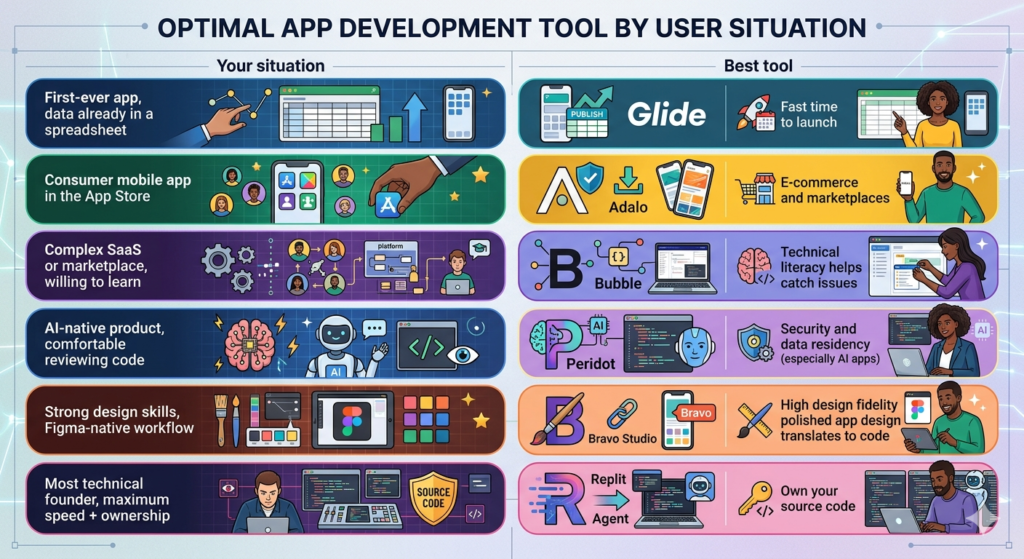
The decision matrix for solo founders
| Your situation | Best tool |
|---|---|
| First-ever app, data already in a spreadsheet | Glide |
| Consumer mobile app in the App Store | Adalo |
| Complex SaaS or marketplace, willing to learn | Bubble |
| AI-native product, comfortable reviewing code | Peridot |
| Strong design skills, Figma-native workflow | Bravo Studio |
| Most technical founder, maximum speed + ownership | Replit Agent |
The question to ask before choosing any tool
“If this tool doubles its price next year, what do I do?”
- Glide: migrate to a different Glide-compatible data source or rebuild the UI layer
- Adalo: rebuild in a different platform — expensive if you’ve invested heavily
- Bubble: rebuild from scratch — very expensive at maturity
- Peridot / Replit: deploy to a different host — the code is yours, migration is infrastructure work
- Bravo: design stays in Figma, rebuild the bridge layer
This question is worth 20 minutes of thought before you commit six months of work. The answer changes how you build even if you never actually need to migrate.
The support and security layer for AI-native apps
One pattern that’s emerging consistently for solo founders building AI-powered mobile apps: the product gets traction, the first enterprise customer appears, and the enterprise IT team asks questions the platform can’t answer.
Two gaps emerge simultaneously:
Security: Where does data go when it hits the LLM API? Who stores the credentials? Is there an audit trail? Peridot handles this — enterprise-grade AI security infrastructure (VPC deployment, credential isolation, audit trails) that solo founders can layer onto their existing application without rebuilding from scratch.
Support: The first enterprise customer expects a support channel, documentation, and an SLA. Most solo founders have none of these. HelpViber is built for exactly this moment — support infrastructure designed for AI-native products that don’t fit Zendesk or Intercom.
Neither is a day-one concern. Both are month-three concerns that reward day-one planning.
Also read
How to Develop an Enterprise Mobile Application in 2026 with Vibe Coding: The Honest Guide
Develop a Enterprise Mobile App Without an Agency: 7 Paths and Their Real Costs
The 8 Best Mobile App Development Platforms for Non-Engineers
How to Choose an Enterprise App Development Platform: The Decision Framework
Mobile App Software Development: In-House vs No-Code vs AI-Assisted
Best Mobile App Creation Software for Solo Founders in 2026
Mobile App Building Software: What the Benchmarks Actually Show