
Most guides on enterprise mobile app development are written by agencies trying to convince you to hire them, or by platforms trying to convince you to subscribe. This one is written for the person who needs to understand the full landscape before making a $10,000 to $100,000 decision — and wants someone to level with them about what each path actually costs, takes, and risks.
Here is what developing a mobile application in 2026 actually looks like.
What “developing a mobile application” means today
The phrase covers a wider range of realities than it did five years ago. At one end: a solo founder who describes an app to an AI coding tool on a Tuesday afternoon and has something in the App Store by Friday. At the other end: a 12-person engineering team spending nine months building a fintech platform with biometric authentication and real-time transaction processing.
Both are “developing a mobile application.” The gap between them — in cost, time, complexity, and outcome — is enormous.
The first decision is understanding which end of that spectrum your project sits on. Most people chronically overestimate their complexity and underestimate what modern tooling can do. The result is that they either overspend on development or stall indefinitely waiting for the right moment to start.
The right moment is now. The tools are better than they have ever been.
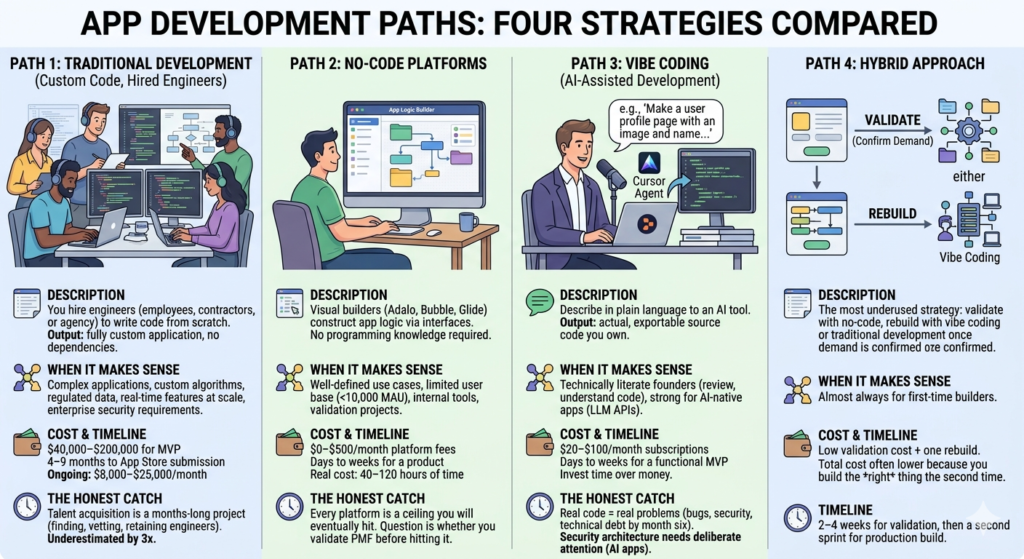
The four development paths available in 2026
Before getting into process, you need to choose a path. Every other decision follows from this one.
Path 1: Traditional development (custom code, hired engineers)
You hire engineers — either as employees, contractors, or through an agency — who write code from scratch. The output is a fully custom application you own entirely, deployable anywhere, with no platform dependencies.
When it makes sense: Complex applications with custom algorithms, regulated data, real-time features at scale, or enterprise security requirements that platforms can’t meet.
Realistic cost: $40,000–$200,000 for an MVP depending on scope and team location. Ongoing maintenance typically runs $8,000–$25,000 per month.
Realistic timeline: 4–9 months from kickoff to App Store submission for a properly scoped MVP.
The honest catch: The talent acquisition process — finding, vetting, and retaining mobile engineers — is itself a months-long project. Most first-time founders underestimate this by a factor of three.
Path 2: No-code platforms
Visual builders like Adalo, Bubble, and Glide let you construct app logic through interfaces rather than code. No programming knowledge required.
When it makes sense: Well-defined use cases, limited user bases (under 10,000 MAU), internal tools, and validation projects where proving demand matters more than building the final product.
Realistic cost: $0–$500/month in platform fees. The real cost is your time — typically 40–120 hours of focused building.
Realistic timeline: Days to weeks for a working product. Hours for simple tools.
The honest catch: Every no-code platform is a ceiling you will eventually hit. The question is whether you hit it before or after you’ve validated product-market fit. For most MVPs, you won’t hit it — and that’s fine.
Path 3: Vibe coding (AI-assisted development)
You describe what you want in plain language to an AI development tool — Cursor, Replit Agent, Lovable, Claude Code — and the tool writes real, exportable, deployable code. The output is actual source code that you own, can modify, and can deploy on any infrastructure.
When it makes sense: Founders with enough technical literacy to review and understand code, even if not to write it from scratch. Particularly strong for AI-native applications that call LLM APIs.
Realistic cost: $20–$100/month in tooling subscriptions. You invest time rather than money.
Realistic timeline: Days to weeks for a functional MVP. Faster than traditional development, comparable to or faster than no-code for experienced users.
The honest catch: Vibe coding produces real code, which means real code problems. Bugs, security vulnerabilities, and architectural decisions that look fine in week one become technical debt in month six. Security architecture in particular needs deliberate attention — especially for AI-native apps handling enterprise data.
Path 4: Hybrid approach
The most underused strategy: validate with no-code, rebuild with vibe coding or traditional development once you’ve confirmed demand. The no-code version becomes your functional specification — a prototype built by someone who actually used it with real users.
When it makes sense: Almost always, for first-time app builders.
Realistic cost: Low validation cost plus one rebuild. Total cost is often lower than going straight to custom development because you’re building the right thing the second time.
Realistic timeline: 2–4 weeks for validation, then a second sprint for the production build.
The technical decisions that determine everything else
Native vs cross-platform vs progressive web app
Native (Swift for iOS, Kotlin for Android): Separate codebases for each platform. Best performance, best access to device hardware, highest development cost. Required for applications that use advanced device features — ARKit, real-time sensor processing, demanding graphics.
Cross-platform (React Native, Flutter): Single codebase that runs on both iOS and Android. 70–90% of the performance of native at 50–60% of the cost. The right choice for the majority of mobile applications. Flutter has become the dominant choice in 2026 for new projects.
Progressive Web App (PWA): A web application that behaves like a mobile app. No App Store submission required. Works on any device with a browser. Lower distribution friction, lower development cost, lower capability ceiling. Appropriate for content consumption, simple workflows, and use cases where App Store distribution isn’t worth the overhead.
The 2026 reality: Vibe coding tools have become most effective with React Native and Flutter. If you’re using AI-assisted development, cross-platform is where the tooling is most mature.
The backend question
Every mobile application needs a place to store and retrieve data. Your options:
Firebase / Supabase: Managed backend services that handle authentication, database, and real-time sync. Free to start, scalable to meaningful user counts, minimal configuration. The right starting point for 80% of mobile applications.
Custom API: You build the server logic yourself. Required when Firebase and Supabase can’t handle your data model or security requirements. Typically added after validation, not before.
No backend: Some applications run entirely on device. Offline tools, games, and calculators fall into this category. Simpler to build, impossible to monetize through subscriptions without eventually adding a backend.
Authentication
How users log in matters more than most first-time builders assume. Options:
- Email and password (still the most common, the most support overhead)
- Social login — Google, Apple (required on iOS if you offer any social login at all), Facebook
- Magic link (passwordless email)
- Phone number via SMS
- Biometric (fingerprint, Face ID) — device-level, not a standalone auth strategy
For most new applications: start with Google and Apple social login. It reduces friction, eliminates password reset support tickets, and Apple requires it anyway if you offer any alternative login method.
The App Store submission process — what nobody prepares you for
This section exists because App Store submission is the step that most delays first-time mobile app releases, and most guides treat it as a footnote.
Apple App Store
Apple reviews every application before it appears in the store. Review times average 24–48 hours for most submissions, but rejections — which require fixes and resubmission — can add days or weeks.
Common rejection reasons:
- Missing privacy policy (required for any app that collects user data — which is almost all apps)
- Sign in with Apple not implemented (required if you offer any other social login)
- Metadata mismatch (screenshots that don’t reflect the actual app)
- Guideline 4.3 — design that appears to be a thin wrapper around a website
- In-app purchases routed around Apple’s payment system
Budget two to three weeks from “ready to submit” to “live in the App Store” for your first submission. Experienced teams with clean submissions get it done in 48–72 hours.
Google Play Store
Google’s review process is faster and less strict than Apple’s. Most submissions go live within 24 hours. However, Google’s post-publication review can remove apps that violate policies after they’re already live — a different risk profile than Apple’s pre-publication review.
Both stores now require target API level compliance. Every year, both Apple and Google raise the minimum SDK version they accept. Applications built on outdated platforms or no-code tools that haven’t kept up with API requirements get rejected. Check platform compliance before you build, not after.
The realistic timeline for a first mobile application
Here is what a well-run first mobile app development project actually looks like, not the optimistic version:
| Phase | Duration | What happens |
|---|---|---|
| Scoping and planning | 1–2 weeks | Define the core loop, sketch screens, choose tech stack |
| Backend setup | 3–5 days | Firebase/Supabase, auth, basic data model |
| Core feature build | 3–6 weeks | The one thing that makes the app worth using |
| UI polish and edge cases | 1–2 weeks | Error states, empty states, loading states |
| Testing | 1 week | Real devices, real users, real data |
| App Store submission | 2–3 weeks | Assets, metadata, review, fixes, re-review |
| Total | 9–15 weeks | From blank canvas to live in both stores |
For vibe coding and no-code paths, compress the build phases. Extend nothing else — the App Store timeline is fixed.
The security layer that most mobile apps skip
In 2026, most interesting mobile applications either call an LLM API, connect to enterprise data, or both. This creates a security surface that didn’t exist in mobile development three years ago — and that most no-code platforms and even most vibe coding tutorials don’t address.
The questions enterprise customers will ask before they allow your app on their devices or networks:
- Where does user data reside? Which country, which cloud provider, which data center?
- How are API credentials stored? Are LLM API keys in the app binary, in a shared cloud environment, or isolated per customer?
- Is there an audit trail of what data was sent to which AI model?
- Does the application support SSO/SAML for enterprise identity providers?
- Has it passed a SOC 2 Type II or equivalent security audit?
No-code platforms answer most of these questions poorly or not at all. Vibe coding tools produce the code but not the architecture. This is the gap that Peridot was built to fill — a secure deployment layer for AI-native mobile and web applications with VPC boundaries, credential isolation, and audit infrastructure that makes enterprise deals possible. If your mobile app is targeting enterprise customers and calls any LLM API, the security architecture conversation needs to happen before you build, not after your first prospect’s IT team rejects you.
What to build first: the core loop rule
Every successful mobile application has a core loop — the single sequence of actions that delivers its primary value. For Uber it’s request, match, arrive. For Instagram it’s capture, share, react. For a B2B field tool it might be log, submit, confirm.
Build that loop first. Build nothing else until it works end-to-end on a real device with real data.
The most common cause of mobile app development failure isn’t technical — it’s scope. Founders build onboarding flows for apps nobody has validated. They build settings screens before the core feature works. They build social features before confirming that anyone wants the core product.
One working core loop, tested with five real users, is worth more than a 47-screen prototype that nobody has used.
The cost breakdown nobody publishes
Total first-year cost for a mobile application, by path:
| Path | Build cost | Infrastructure | Maintenance | Year 1 total |
|---|---|---|---|---|
| Traditional dev (agency) | $60K–$150K | $200–$2K/mo | $5K–$15K/mo | $120K–$300K+ |
| Traditional dev (employees) | $40K–$80K | $200–$2K/mo | $8K–$20K/mo | $140K–$320K+ |
| No-code | $0–$2K | $50–$500/mo | $500–$2K/mo | $2K–$10K |
| Vibe coding | $500–$2K | $50–$500/mo | $1K–$5K/mo | $5K–$20K |
| Hybrid (no-code → rebuild) | $2K–$15K | $50–$500/mo | $2K–$8K/mo | $10K–$30K |
These are ranges, not guarantees. The variables that move costs most significantly: number of platforms (iOS only vs both), backend complexity, third-party integrations, and whether you need enterprise security architecture.
The decision you actually need to make
Stop optimizing for the best possible technical architecture and start optimizing for the fastest path to five users who tell you the app is essential.
If you can get there with no-code: do it. The sophistication of the build is irrelevant until someone needs it.
If you need custom logic, AI features, or enterprise deployment from day one: skip the no-code phase and go straight to vibe coding with deliberate security architecture.
If you’re building for enterprise customers and your app calls an LLM: plan the security layer before the first line of code is written. Adding it later costs three times as much and loses deals in the meantime.
The rest is execution.
Also read
How to Develop an Enterprise Mobile Application in 2026 with Vibe Coding: The Honest Guide
Develop a Enterprise Mobile App Without an Agency: 7 Paths and Their Real Costs
The 8 Best Mobile App Development Platforms for Non-Engineers
How to Choose an Enterprise App Development Platform: The Decision Framework
Best Mobile App Creation Software for Solo Founders in 2026
Mobile App Software Development: In-House vs No-Code vs AI-Assisted
Mobile App Building Software: What the Benchmarks Actually Show
Pingback: Develop a Enterprise Mobile App Without an Agency: 7 Paths and Their Real Costs - Peridot Blog
Pingback: The 8 Best Mobile App Development Platforms for Non-Engineers - Peridot Blog
Pingback: How to Choose an Enterprise App Development Platform: The Decision Framework - Peridot Blog
Pingback: Mobile App Software Development: In-House vs No-Code vs AI-Assisted - Peridot Blog
Pingback: Best Mobile App Creation Software for Solo Founders in 2026 - Peridot Blog
Pingback: Mobile App Building Software: What the Benchmarks Actually Show - Peridot Blog